
S Corp Tax calculator
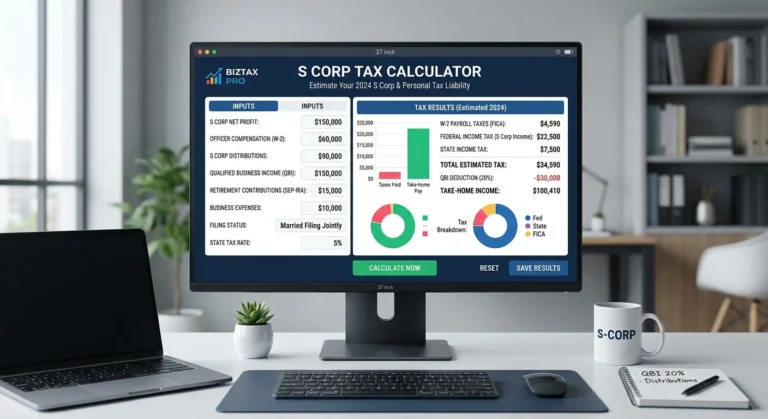
This Tax calculator for scorp compares your self-employment tax as a sole prop against your payroll tax and costs as an S corp, so you see an actual dollar figure, not a rule of thumb.
S corp tax savings estimator
*Estimates 2026 federal payroll taxes ($184,500 SS cap), 0.9% Additional Medicare, OBBBA-widened §199A QBI wage phase-out ranges ($75k / $150k), integrated tax bracket progressive QBI value calculation, and half-SE tax QBI deductions. Salary ratios are general estimates; reasonable compensation must be determined by actual IRS factors. Excludes state income tax, state-specific franchise taxes, and spousal wage stacking.
Disclaimer: This tax calculator is provided for general informational and estimation purposes only. The results are estimates and should not be considered formal tax advice, tax preparation, or a guarantee of your actual tax liability or refund. Tax outcomes may vary based on your individual circumstances, applicable tax laws, deductions, credits, and other factors. For advice specific to your situation, please contact us and consult with a qualified tax professional.
FILL OUT THE S CORP FORMATION FORM TO GET MORE INFO ON YOUR TAX SAVINGS
How it works
1. Enter your net business income
Enter your business profit before owner compensation in tax calculator s corp. This is generally the amount left after eligible business expenses, rather than your personal take-home pay.
2. Set a reasonable salary
Enter a reasonable compensation amount based on the services you provide to the business. The salary should reflect factors such as your role, experience, responsibilities, and what you would reasonably be paid for similar work.
3. See the split and the savings
The calculator compares estimated self-employment tax under a sole proprietor structure with estimated payroll taxes and S Corp administrative costs. It then shows the estimated difference so you can see the potential net impact.
Where tax savings come from
For many sole proprietors and single-member LLC owners, qualifying net earnings from self-employment are generally subject to self-employment tax, along with applicable federal income taxes. An S Corp can change how some business income is treated by separating shareholder compensation from certain business distributions. Shareholder-employees who provide services generally must receive reasonable compensation as wages, while qualifying distributions may not be subject to self-employment tax. The potential difference between these tax treatments is one of the factors an S Corp tax calculator can help you estimate. Check more on s corp on https://www.irs.gov/businesses/small-businesses-self-employed/s-corporations.
The trade-off is that an S Corp also comes with additional responsibilities and costs. You may need to run payroll, pay reasonable compensation for services provided to the business, and cover expenses such as payroll processing, tax filing, bookkeeping, and other administrative requirements. The calculator below considers these potential costs alongside the estimated tax difference, helping you compare the potential net impact rather than looking at tax savings alone.
S Corp Tax Calculator: How to Calculate Your Savings the Right Way
If you have a small business, you’ve likely heard that choosing S corp status can lower your tax bill. But hearing that and actually knowing your numbers are two different things. That’s where a s corp tax calculator comes into play. Instead of guessing, you input your income, expenses, and proposed salary, and it gives you a realistic estimate of what you would owe and what you could save.
In this guide, we’ll walk through how the tool works, why it’s worth running the numbers before you make any changes to your business structure, and what to watch out for so the estimate actually holds up.
What Is It?
This kind of tool is a simple online calculator that asks for your business income and gives you an estimate of the taxes you’d owe running as an S corporation. It usually asks for your net business profit, a reasonable salary figure, and sometimes your state, since state tax rules can change the final number.
Here’s why that matters: S corp status changes how your income is taxed. You split your income into salary and distributions, instead of paying self-employment tax on all of your profit. Payroll taxes only apply to the salary portion. The calculator shows you exactly how much that split could save you compared to being a sole proprietor or single-member LLC.
Most people looking for this aren’t after a tax lecture. They want a figure, and a good tool gives you exactly that: a side-by-side comparison of what you’d pay under your current structure versus what you’d pay as an S corp, based on the numbers you enter.
Why Run the Numbers Before You Decide
Many business owners choose S corp status simply because they’ve heard it saves money, without checking whether it actually makes sense at their income level. A s corp tax savings calculator fills that exact gap. It gives you a number, not a guess.
Here’s generally how the process works:
- Fill in your expected annual net income
- Propose a reasonable salary for yourself
- The tool estimates your self-employment tax and payroll tax under both a sole proprietor and an S corp structure
- You compare the two totals to see the real dollar difference
For many owners, this comparison shows that the benefit only really kicks in once net profit crosses a certain level, often somewhere in the $40,000 to $80,000 range, depending on the state and the salary you’d need to pay yourself. Below that, the cost of running payroll and filing a separate corporate return can eat up much of the savings.
This is worth checking more than once. Income rarely stays flat year over year, and a result that made sense last year could look very different once your revenue grows or your expenses shift.
Getting the Salary Figure Right
Your reasonable salary is the single biggest input into any s corp tax calculator. Set it too low, and you risk IRS scrutiny for underpaying yourself to dodge payroll tax. Set it too high, and you eat into the very savings you were hoping to capture.
A good tool lets you test a few different salary levels side by side, which is far smarter than picking a number out of thin air and hoping it holds up if the IRS ever asks questions.
Part of what makes this tricky is that the IRS doesn’t use a one-size-fits-all formula. Your industry, the hours you work, what similar roles pay in your area, and how much of the business’s income comes from your own labor versus capital or other employees all factor into what counts as reasonable. The calculator can’t make that judgment call for you, but it can show you the tax consequences of a few different salary levels so you’re weighing real numbers instead of a guess. For tax advice contact us.
Choosing the Right Calculator for Your Business
Not every tool out there is built the same way. Some are bare bones, asking only for net profit and salary. Others let you factor in state taxes, retirement contributions, or health insurance premiums, which can shift the final number quite a bit.
Before trusting a result, it helps to understand what assumptions a s corp tax savings calculator is making behind the scenes. One built only around federal self-employment tax rules will give you a different, and often less complete, picture than one that also accounts for your state’s specific S corp taxes or fees.
If your business operates in more than one state, or has employees beyond yourself, a basic version may not be detailed enough. It can still work as a first pass, but you’ll likely need a more thorough projection from an accountant before making a final call.
How Accurate Are These Estimates?
Most versions are built around federal tax assumptions. That makes them generally solid for comparing self-employment tax against payroll tax at the federal level, but they may not fully account for state-specific S corp taxes, franchise fees, or local filing requirements. Before trusting the final number, it’s worth checking whether your state’s rules are factored in, or only the federal picture.
It also helps to remember that any calculator is only as good as what you enter. If you plug in last year’s income but this year has been noticeably better or worse, the result will be based on outdated assumptions. Updating your inputs regularly, rather than running it once and treating the result as permanent, keeps your planning accurate.
When the Numbers Actually Matter
Running the numbers through a s corp tax calculator matters most at a few key moments:
- Before you file an S corp election, so you know it’s really worth the extra paperwork
- Early in the year, so you can reset your salary based on updated profit projections
- Any time your income changes significantly, since a salary that made sense at $60,000 in profit may not make sense at $150,000
- Whenever you switch payroll providers or accounting software, since the assumptions built into a new tool may differ from the old one
- Before a major purchase or hiring decision, since your expected tax liability affects how much cash you actually have available
Treat it as a yearly check-in rather than a one-time decision, so your salary and savings stay aligned as the business grows. Skip this step and you may end up overpaying yourself in salary long after it stopped making sense, or underpaying yourself in a way that’s harder to justify as you scale.
Common Mistakes to Avoid
Even with a solid tool in hand, it’s easy to get the estimate wrong. Some of the most common mistakes:
- Entering an unrealistically low salary just to maximize the savings number
- Ignoring state taxes because the calculator you used only covers federal figures
- Using outdated income numbers instead of current-year projections
- Assuming any result replaces the need for a CPA’s review
- Forgetting to rerun the numbers after a major income or business change
- Comparing results across tools without checking whether they use the same assumptions
That last one trips up more people than you’d expect. Two different calculators can give very different results simply because one accounts for retirement contributions or health insurance premiums and the other doesn’t. When comparing tools, make sure you know what each one is and isn’t including.
Final Thoughts
An s corp tax calculator is one of the fastest ways to go from “I think S corp status would save me money” to actually knowing the number. Whether you use a simple version or a more detailed s corp tax savings calculator, the goal is the same: get a realistic estimate before making a structural change to your business.
Once you have that number, the smart next step is sitting down with a tax professional to confirm your reasonable salary and make sure it holds up if the IRS ever takes a closer look. The calculator gets you most of the way there, but it’s always worth a second set of eyes on the final decision.
FAQ
Is this accurate enough to make a final decision? It’s a great starting point, but shouldn’t be your only input. State rules and your individual situation can shift the final number.
How often should I rerun the numbers? At least once a year, or any time your income or salary changes significantly.
What information do I need to get started? At minimum, your projected net business profit and a proposed reasonable salary. Some versions also ask for your state and any retirement or health insurance contributions.
Can this tell me if S corp status is right for my business? It can show you the tax difference, but you should also weigh the added administrative work, payroll costs, and your long-term growth plans.